
As mentioned in detail in my previous article, QoS is a network service that aims to reduce time loss by prioritizing applications within the network. The packets in the traffic are prioritized and the communication is realized more efficiently and quickly through QoS by using various techniques. In this way, access interruptions and packet delays can be avoided. Bandwidth efficiency is inversely affected by the number of users. As the number of users increases, the number of data packets and the number of applications/services within the same bandwidth will increase, thus negatively affecting the services and slowing the network traffic. For this reason, it is necessary to give priority to the addresses or ports used by some services or applications in order for the data traffic to meet the right needs. The implementation of the QoS configuration begins with identifying the types of traffic that use high volumes of bandwidth and are susceptible to latency or packet loss. However, the configuration phase is a very critical process because with an incorrect configuration to be applied, packets of other applications or services in the traffic may be delayed, causing some services to be adversely affected.
The vast majority of services or applications that run within the network and typically use UDP instead of TCP for transmission are latency sensitive. Examples of common services used are; VoIP, online gaming, live media streaming, video conferencing or IPTV can be given.

Classification and Marking play a major role in ordering and shaping network traffic. Most classification and marking tools, like other QoS tools, often work on packets entering or leaving an interface. QoS Classification tools examine the contents of packet headers and classify packets. QoS marking tools, on the other hand, allow changes in the packet headers of the data for easier classification.
Packet classification enables particular packet traffic or group of packet traffic to benefit from the same services by grouping them in the same class. This allows classified traffic to be treated differently from others. For example, the type of data traffic assigned to one class can be prioritized over other classes.
On the other hand, package marking makes certain markings within the package headers to facilitate the classification of packages into certain classes. Giving sorting preference to classed packet traffic with packet marking or dropping a packet or shaping packets or inspecting packets or smashing packets etc. operations are performed by changing or marking some bits in the packet header. This way, the flagged bits are examined first before other QoS tools on the network can classify packets or implement certain services.
Classification
Classification is the process of queuing a particular packet of traffic in a different queue from the others in existing traffic in the network. Packages in which this action is applied must be recognized by the device’s operating system.
Classification can also be implemented using the ACL (Access Control List). If the ACL allows a packet to pass, the packet traffic is queued. Incoming packets according to different ACL rules are taken into different queues. If packet traffic is blocked via ACL, the job is not queued. Thus, a simple classification process is applied.
Classification with NBAR – NBAR classifies packages that are normally difficult to classify. For example, some applications use variable port numbers. Therefore, traffic cannot be classified using a statically configured match command that looks for a specific UDP or TCP port number. NBAR inspects beyond the UDP and TCP header and can refer to the device name, URL, or MIME type in HTTP requests. This kind of deeper analysis of package content is called deep package inspection.

Marking
Marking is implemented by changing some bits in the packet header to allow network devices to classify them according to the values marked by the QoS tools. Depending on the rule set to be applied to the packages, more than one field can be marked and each markup serves a specific purpose. Although it works like an ACL by nature, instead of allowing or denying a packet, packets are flagged in traffic.
Some marking options make sense for devices used within the LAN, while others only make sense when used with certain hardware platforms. It is also of course possible to mark data packets on WAN traffic.
If it matches a specified rule set or criteria, the field with the value is marked when the packets coming from the source to the destination enter the interface. If the package does not match one of the available rule sets, it is compared with the other rule sets or criteria. In case of a match, a potentially different field is marked with a value from the set it matches. The search for the package continues until the package matches one of the certain rule sets or a certain criteria group. If none of the rule sets are matched, the data packet is processed by placing it in the standard order without any marking.
Various applications can be marked differently, allowing network equipment to separate data into different groups. After the packets in the traffic are marked and separated into different groups, queuing is created in order to compare the data with each other and to increase the efficiency of the communication. It can only be used for classification or marking on appropriate interfaces. Classification is generally used for packet traffic arriving at the interface during transmission (Ingress) while marking is generally used for packet traffic leaving the interface during transmission.
How much space do QoS techniques occupy under the packet header of which protocol is shared in the table below? The number of different customizations that can be made in the traffic is calculated by calculating “a bit over 2”.

CoS – Class of Service
Class of Service (CoS) is a way of managing traffic on a network by grouping similar types of traffic (email, streaming video, audio, large document file transfer) together and treating each type, even different, as one with its own class. Thus, it enables the determination of the service priority level. In addition, traffic management with CoS becomes simpler and more scalable as the network structure and traffic volume grows.
Classification and marking tools classify packages based on a large number of different fields within the package header and queue them accordingly. Based on the classification, the tools then mark the field in a packet header so that other QoS tools can more easily classify and perform certain QoS actions based on these marked fields.
IP packet headers tagged with higher priority CoS values are transmitted earlier, while lower priority CoS values wait in a queue to be transmitted later from priority packets. This is why CoS is important for real-time streaming data such as audio and video. 3 bits are used to make these prioritizations and to differentiate service classes. This gives a total of 8 different possibilities. CoS bits are located inside the IP packet headers. They are called “Precedence Bits” or “User-Priority Bits”, that is, priority-determining bits, and are included in ToS or DSCP as it is used today.
There are multiple models that use the CoS technique, but the QoS standard is offered with the main models DiffServ and IntServ, implementing a QoS configuration without these models is not a complementary practice. These models and technologies;
- Best Effort
- Differentiated Services (DiffServ)
- Integrated services (IntServ)
- RSVP-TE – Traffic Engineering (Resource Reservation Protocol)
ToS – Type of Service
The Type of Service (ToS) field is located in the second byte of the IPv4 header. It can distinguish between different traffics in a well-managed network. This means that a network can better serve traffic types that require high reliability and throughput with minimal latency. Similarly, other less important traffic may be dropped on the service they receive, as they are likely to be more tolerant of network delays. Type of Service (ToS), also known as Differentiated Services (DiffServ), is part of the Quality of Service (QoS) model. ToS is used by components in the network to define how they should prioritize the packet they receive. Today, ToS is developed and made available as DiffServ. The ToS byte is used as a reserved field to mark the packets of the specified data in the traffic. Bits 3 to 6 of the ToS Byte contain fields that are modified to indicate a particular QoS service.
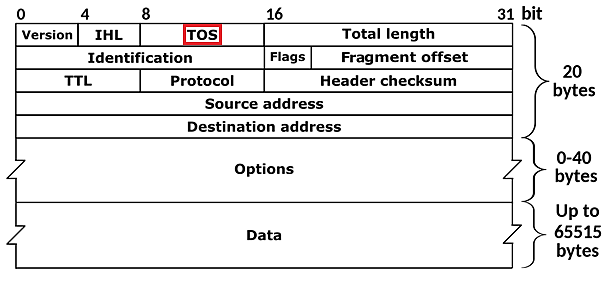
It is used to parse the first 8-bit packet for the ToS bits to be used in the IP packet header of the data in the network traffic, so there are 256 different separations in the “2n “expression.
DSCP is a QoS technique that specifies a simple and scalable mechanism for classifying and managing network traffic and providing quality of service (QoS) in modern IP networks. It is used to describe the quality of service packs in the network. The DSCP contains only priority bits and is 6 bits in total. It is contained in the IP packet. QoS tools may need to be configured on edge devices to look at the DSCP and then mark a different domain. CoS marks a data stream in the Layer 2 packet header, while DSCP flags data streams in the Layer 3 packet header.
In this case, there are 64 different parsing possibilities. The default value for DSCP is determined as “000000” in the IP packet header in order to ensure that it does not comply with any parsing class and to provide the best performance in traffic. It has been created so that it can also be used with predefined and classified ready-made parsers for DSCP. As an example of this situation, “Voice Admit (VA) i.e. 101100” can be used, which provides packet transmission assurance for low packet loss, low latency, and low noise voice traffic. It is numbered DSCP 44 for distinguishing. These numbered classes are standardized by the IANA.
A detailed list of ToS bits and DSCP classifications is available below.
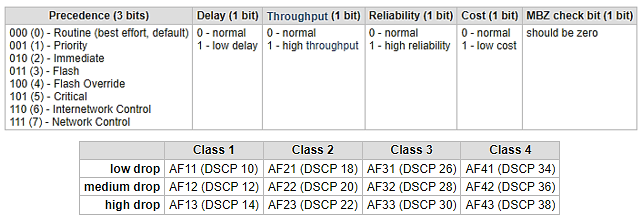
The table shows that within the same class, higher DSCP numbers may have lower priority (higher packet drops). For example, DSCP 34 will take precedence over DSCP 38 with less packet loss. Patterns expressed with AF expression are given in the table below. The first three values refer to the CoS bits.

RSVP – Resource Reservation Protocol
It allows the allocation of network resources to be reserved according to the traffic of different types and origins, defining certain limits and guaranteeing a certain amount of bandwidth. It is a protocol that reserves the transmission organs of resources such as bandwidth or network equipment in the network and ensures that the data flows for the specified applications or services are used in a way that provides the specified QoS level. Thus, thanks to resource reservation, it is ensured that different types of traffic are separated, certain limits are defined for the relevant services or applications, and bandwidth is guaranteed. Even if the application or service is not used all the time, a fixed area within the bandwidth is reserved ready for that application traffic.
IntServ – Integrated Services
It is a QoS model that works by testing the bandwidth of a particular route in the network and maintaining the transmission rate within the route. The application, which will play an active role in the transmission, instantly requests resources for efficient communication from the network devices on the transmission path. All routers allocate resources along the entire path until the transmission is complete, and once the resources are ready, data begins to move. However, the use of IntServ can have negative results on packets in networks where multiple critical applications can request resources at the same time.
DiffServ – Differentiated Services
Requests resources from network devices by the application or service from which the transmission will begin. However, instead of pre-reserving the transmission path for the data to be transmitted, as implemented in the IntServ model, resource preparation for transmission begins the moment the data packet arrives at the router device. Thus, available resources can be used more effectively. Since a pre-reserved route is not requested, the data is transmitted directly to the router. For the packet coming to the router, a path is allocated from the bandwidth on the transmission interface momentarily. This path becomes ineffective after the transmission has taken place. In this way, bandwidth can be used more efficiently when the application or service is not used.
The first router to receive the packet adds a value in the IP packet header indicating the priority of the data. Each router that the data will visit reads the priority value and processes the data according to this value if the necessary QoS settings have been made on them. If there is no QoS configuration on the router on the route, then the device does not care about the value at all and places it in one of the default queues as a standard packet. Thus, while in the IntServ model, each router has to understand the priority on the route and prioritize the packet on the line before the packet travels, the DiffServ model appeals to a much wider area in practice and offers scalability.
Best Effort
Although Best Effort is actually a QoS model, it works against these models in terms of its working structure. Because it gives the same priority to all data packets on the transmission line and ensures that they are transmitted with equal value. It can be thought of as a QoS method based on balanced transmission without prioritizing any packets, it works with FIFO (First in First Out) in the form of standard queuing.
As a result of the correct configuration of the above-mentioned QoS applications, it will be seen that the delays in traffic are reduced, there are no packet losses, there are no problems such as interruptions in communication or disconnection/freezing in the applications, the network resources are used more efficiently with optimum performance, and it will be reflected in the user experiences. In addition, a table where bit calculations of QoS services and techniques can be made is shared below.
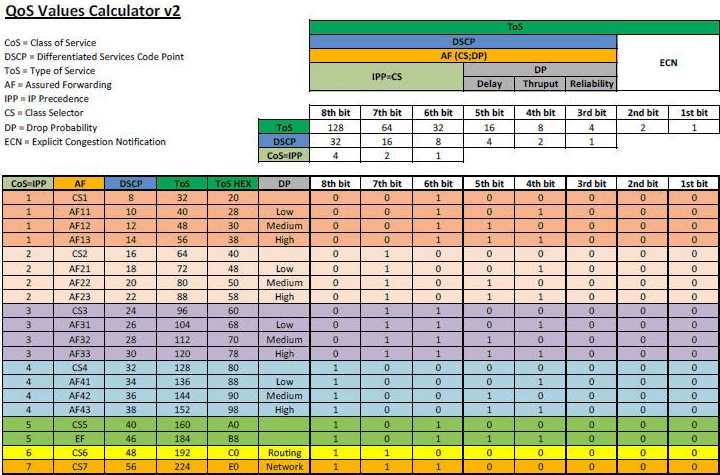
In addition, definitions of data structures used in data transmission and QoS terms used in network traffic are given below.
- Frame — Consists of bits that contain the link layer header of the data and information about the content. It is located on Layer 1-2.
- Packet — Consists of bits that contain the network layer header but not the data link header. Located in Layer 3.
- Segment — Consists of bits that contain the TCP or UDP header, but not the data link or network layer header. Located on Layer 4.
- Data — Layer 5-6-7 where all the information about the data is contained.
- Throughput: It is the rate of data whose transmission is completed smoothly between two points where data transmission will be provided.
- Packet Loss: The amount or rate of packets whose transmission was initiated by the sender but failed to reach the receiver.
- Committed Information Rate (CIR): It is the promised data rate.
- Peak Information Rate (PIR): It is the point at which the data rate can peak within the bandwidth.
- Maximum Transfer Unit (MTU): It is the maximum amount of data that can be transferred instantly in transmission. The maximum size of a data packet in the network can be 65,535 Bytes. The MTU value for Ethernet networks is determined as 1500 Bytes as standard. If the size of the data packet sent is larger than the MTU value determined in the network, this data packet is divided into smaller pieces and transmitted. This process is called Fragmentation. Packet headers are also added to the data value in the data transmission.
- Committed Burst Size (CBR): It is the guaranteed size of the transmission of the committed data packets in the traffic. For this reason, if the size of the data packets is known in bytes in the applications used, this value can be adjusted according to the need and the data packets are transmitted at this minimum value, increasing the efficiency and ensuring the transmission. But in network devices, the default value is always defined as zero “0” so it will be processed automatically.
- MBR: Maximum Burst Size (MBR): It is the maximum data packet size that is allowed to be processed instantaneously.
- Delay: It is the transmission time between each data packet transmitted from the sender to the receiver.
- Jitter (Difference Between Delays): It is the time difference between delays. For example, if the first packet is transmitted in 3 seconds, the second packet is transmitted in 5 seconds, the third packet is transmitted in 8 seconds, and the delay time in transmission increases, it can be said that the Jitter increases. In summary, the difference between the delay times is expressed as Jitter.
