
Data Loss Prevention (DLP) solutions are a critical security layer designed to prevent organizations’ sensitive data from being shared with unauthorized individuals, exfiltrated, or used in an uncontrolled manner. However, a DLP product “scanning a file” does not necessarily mean it is analyzing the file’s entire content. In DLP systems, a distinction must be made between at least three different limits: the maximum file size the system can accept, the amount of content that can be extracted from the file and analyzed, and the maximum time the analysis engine can allocate to this process. Crucially, however, the standard scanning size often falls well below the average file sizes circulating within corporate traffic.
There is a significant detail in DLP architectures that can easily be overlooked: the physical size of a file and the amount of content analyzed by the DLP engine are not the same thing. A file might be 10 GB in size, yet the DLP engine may extract and analyze only a specific amount of text from it. These standard limits can be raised to the maximum thresholds predefined by the manufacturers. Manufacturer documentation clearly states that increasing these limits for large files directly leads to higher memory consumption and processing loads. For instance, a file itself might be 20 MB, but the text extracted from it could reach 40 MB. Even if the DLP product physically accepts the 20 MB file, the content extraction engine may only be able to pass a specific amount of text to the classification engine.
This situation is neither a product defect nor a vulnerability concealed by the manufacturer, and it should not be regarded as a DLP bypass method. On the contrary, it is explicitly defined as a design limitation in the official documentation of many enterprise DLP platforms due to considerations regarding performance, memory usage, analysis time, and scalability. This is because, in most cases, the behavior is not unexpected. The real issue lies in organizations or individuals being unaware of these limits or failing to account for them within their security architecture. Therefore, these limits should generally be viewed as an engineering trade-off between resource management and security scope, rather than as a security vulnerability.
According to Gartner reports, one of the DLP products with the highest adoption rates sets the “Extracted Text Size Per File” parameter to 1 MB. The same documentation indicates that the actual file size can be significantly larger than this limit. Consequently, if an Excel file containing 100,000 rows is processed—even in Discovery mode—only approximately 4,000 rows are scanned, and a result is generated without examining the remaining rows.
Additionally, the standard analysis durations defined by vendors play a crucial role at this stage. When the agent submits a task to the analysis engine, the system assigns a standard analysis duration based on the task type. This allocated duration represents the time budget available to the DLP engine for policy analysis. Once the time expires, the engine returns a result based on the analysis performed up to that point; the policy engine returns the best available result, and the final action is determined based on this partial analysis.
For instance, sensitive information within a PDF file might exist directly in the raw file, inside a compressed Office document, or as an image. The DLP engine must first convert this content into an analyzable format. For example, when analyzing a simple 2 MB TXT file, only the first 1 MB might be scanned, and the process could hit analysis time limits depending on the TXT content. Furthermore, even with a small 500 KB file, factors such as complex PDF structures, DOCX files with numerous embedded objects, nested Office documents, documents requiring OCR, or content subject to extensive regex processing do not guarantee that the DLP system will scan the file with optimal efficiency within the allotted analysis time.
This is because the DLP engine does not merely read a file; simultaneously, it:
- Analyzes the file format.
- Extracts the content.
- Can decompress archives.
- Processes nested files.
- Can perform OCR.
- Normalizes the text.
- Executes regex.
- Performs dictionary matching.
- Can conduct fingerprint/EDM checks.
- Can run machine learning models.
- Can perform policy evaluation.
- Can transmit results to the incident management system.
All of these operations consume CPU, RAM, disk resources, and time.
Especially considering that hundreds or thousands of operations may occur simultaneously—particularly in Network DLP systems—performing theoretically unlimited content analysis is impractical. However, if a specific file requires scanning, the inability to scan the file in its entirety and provide results creates a significant security gap for organizations.
When a file is encountered within the DLP system, content analysis is not performed based solely on the file extension. First, the file type and structure are determined; if the format is supported, the content is converted into a form suitable for analysis. At this stage, text—and other content components where necessary—can be extracted from various formats such as PDFs, Office documents, email files, archives, or images. For image-based documents, OCR (Optical Character Recognition) can be used to convert text within the image into textual content. The extracted content undergoes normalization and relevant processing steps before being passed to the DLP engines responsible for sensitive data detection. Methods such as regex-based rules, dictionaries, data matching techniques (e.g., fingerprinting/EDM), or machine learning-based classifiers may be employed at this stage. Finally, the analysis results are compared against the organization’s DLP policies, leading to a policy decision—such as blocking, quarantining, monitoring, or allowing the file.
Compressed file formats—such as ZIP, RAR, TAR, and the like—present a distinct challenge for DLP systems. The DLP engine must be capable of executing the following stages sequentially. In some products, for instance, limits may be imposed on the total size of extracted sub-files (e.g., 50 MB) and the number of sub-files (e.g., 100), alongside specific limits on the amount of text extracted per file.
- Its ability to open the archive,
- Its ability to extract the files within,
- Its support for nested archives,
- Its ability to process a specific number of sub-files,
- Its ability to manage the total volume of extracted data,
- Its ability to analyze the content of each sub-file.
For this reason, DLP tests should not be conducted merely on a “sensitive data present/absent” basis. It is to be expected that tests such as “we placed a credit card number in a file and the DLP detected it” will not yield accurate results.
Below, screenshots and source references are provided for documentation—sourced directly from the websites of leading DLP vendors—detailing scanning sizes and analysis times.
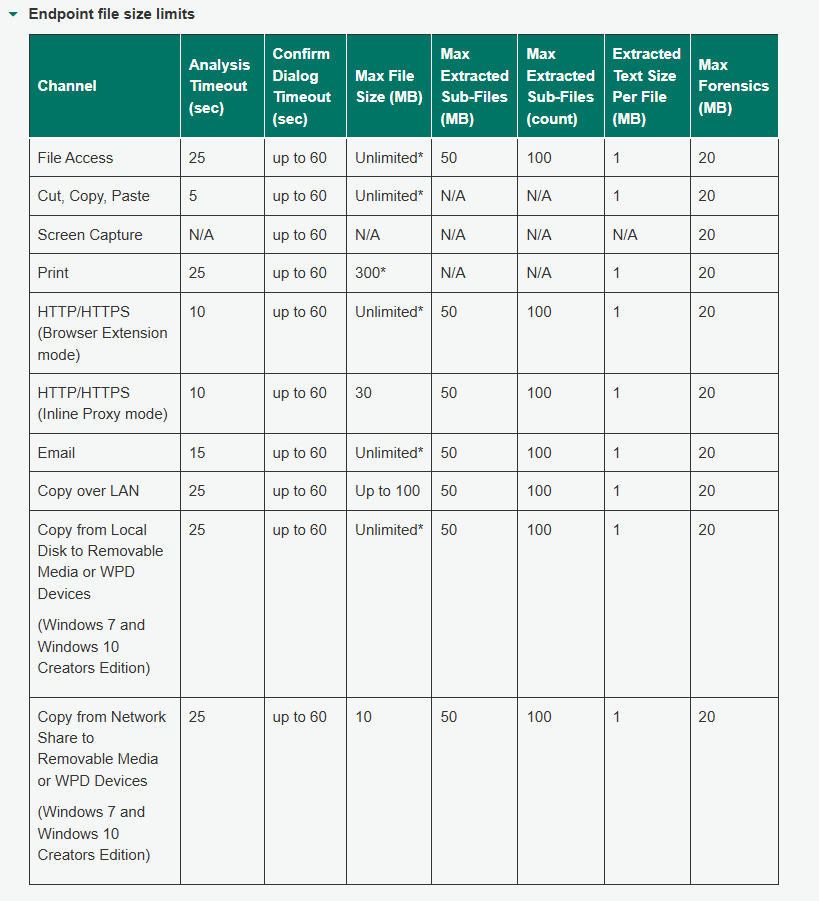
While the maximum file size for Forcepoint DLP scanning is often set to “Unlimited,” the amount of textual content extracted from a file and passed to the analysis engine is set to a default of 1 MB; only the first 1 MB of extracted text per file is included in the analysis. Additionally, the system does not perform content extraction on files exceeding 100 MB, relying instead on metadata such as file name, file size, and binary fingerprint. The binary fingerprint is generated using 5 MB samples from both the beginning and the end of the file and requires an exact match. This limit applies to each individual file or sub-file within an archive. Forcepoint also limits the total data extracted from archives to 50 MB and the number of sub-files to 100.
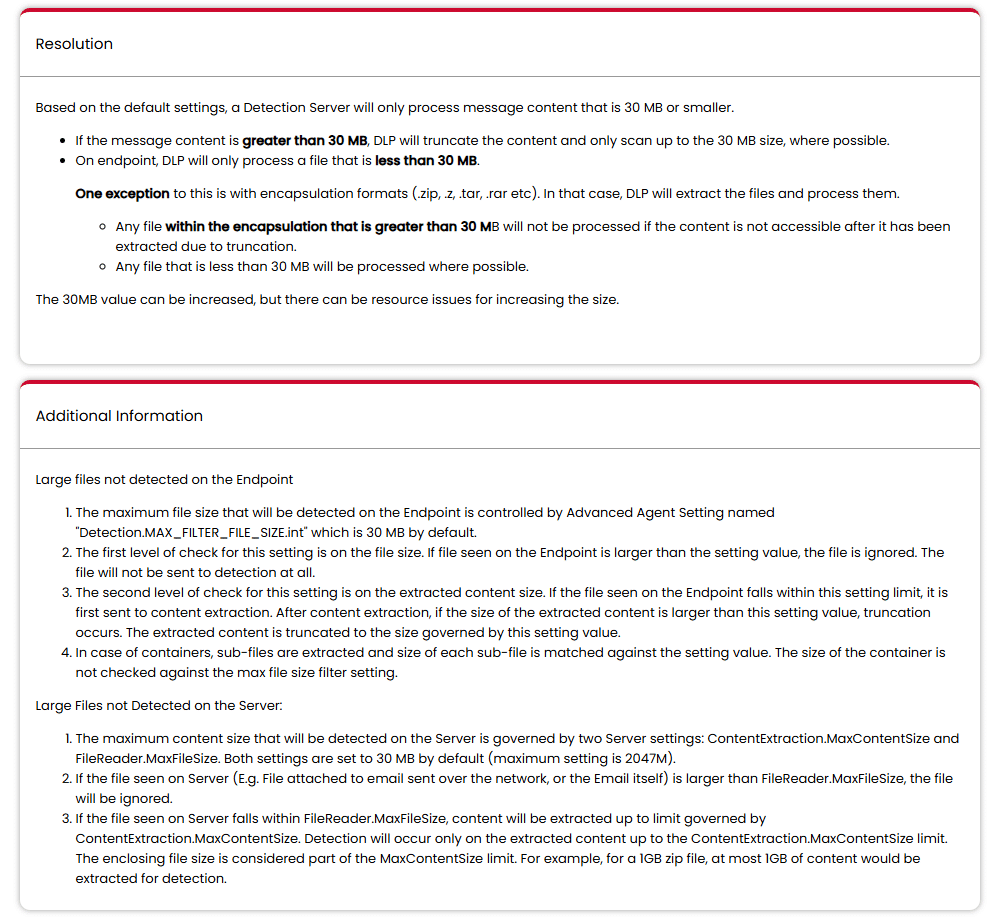
Broadcom’s Data Loss Prevention documentation specifies a default file processing limit of 30 MB; however, the product evaluates the file size and the extracted content size as separate stages. On the endpoint side, if the file size exceeds 30 MB during the initial check, the file is not sent for detection. If the file falls within this limit, content extraction is performed, and the size of the extracted content is checked separately; if this content exceeds the limit, the extraction result is truncated. In other words, the physical size of the file is checked; if it is larger than 30 MB, the file is ignored and never sent for detection. If it is under 30 MB, content extraction is performed; if the resulting content exceeds 30 MB, it is truncated to 30 MB. On the server side, two separate parameters are used: FileReader.MaxFileSize and ContentExtraction.MaxContentSize. Both parameters have a default value of 30 MB, and the documentation states that support extends up to 2047 MB.
Therefore, when evaluating the actual analysis scope of a DLP solution, the question “What is the maximum file size?” alone is insufficient. Questions such as “What is the limit for extractable content?” “What is the defined timeout for analysis?” and—more importantly. “What decision does the system make when any of these limits are reached?” must also be answered.
